

My Desktop was a graveyard of screenshots. Dozens of them, all named some variation of Screenshot 2026-08-08 at 10.34.22 AM.png, each one a 6MB mystery I’d have to open just to remember why I took it. Renaming them after the fact is one of those chores nobody actually does. So I built a tiny Mac app that fixes the problem at the source.
It’s called Screenshot Renamer, it’s free, and it’s open source.
What it is
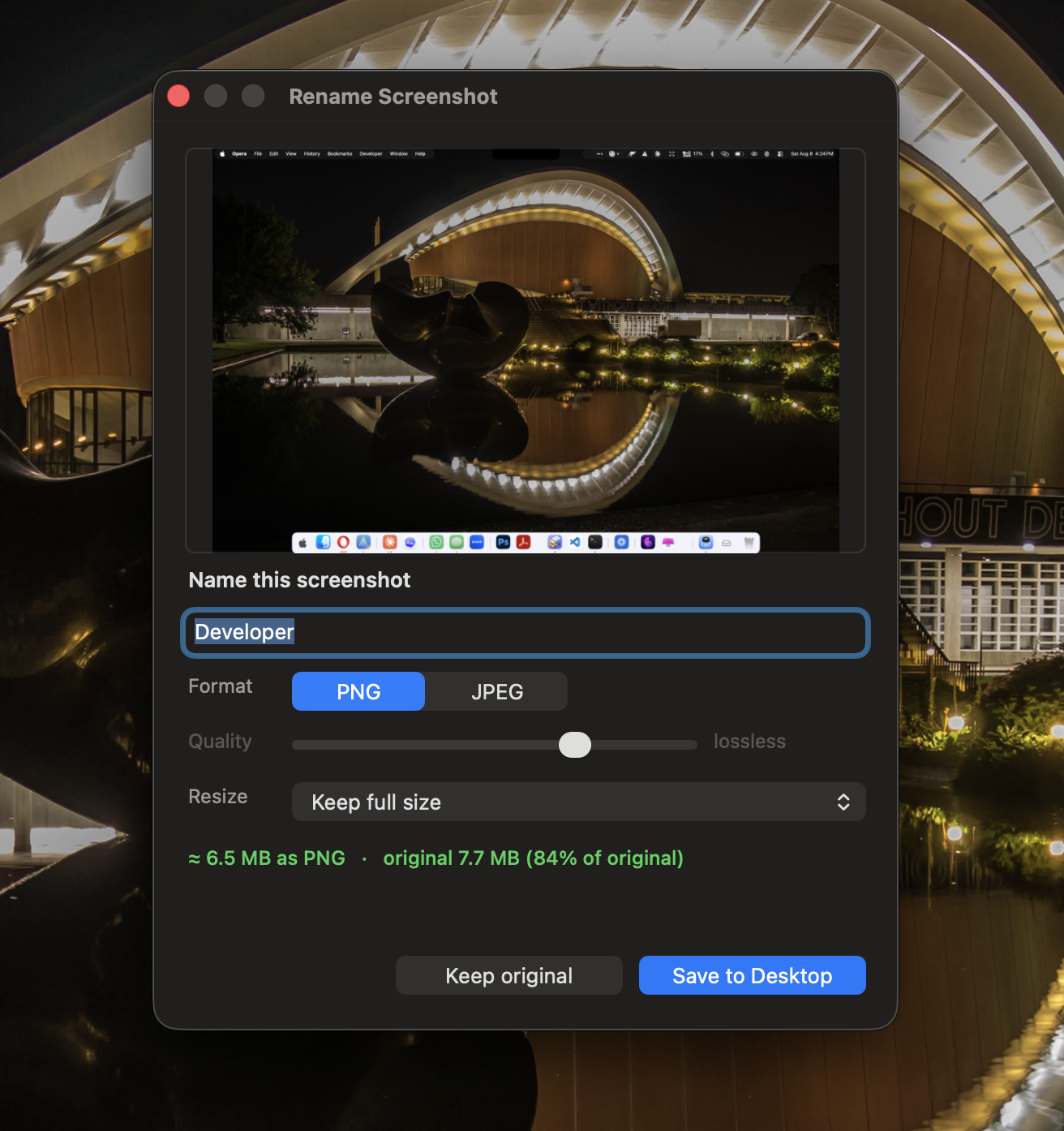
Screenshot Renamer is a native macOS menu-bar app. The moment you take a screenshot, a small window pops up with a preview and a name box, and the name is already filled in with the most prominent text it read on the screen. A window title, a headline, a button label. You glance, tweak if you want, hit Return, and it saves to your Desktop with a real human name.
While it’s there, it also lets you decide how to save it:
Format, keep it a lossless PNG, or convert to JPEG to shrink the file dramatically. Quality, a slider for JPEG, with a live estimate showing the resulting file size as you drag. Resize, optionally cap the width (say, 1920px) for a web-friendly version.
So a 6MB Retina screenshot can become a tidy, well-named 400KB JPEG before it ever touches your Desktop. No trip to Preview, no separate compression tool, no renaming later.
The problem it solves
Screenshots are the fastest way to capture something, a bug, a design, a receipt, a funny message, but macOS gives them the worst possible names and the biggest possible file sizes. That combination quietly costs you twice.
First, you can never find them. “Which of these 40 identical timestamps was the invoice?” You end up opening them one by one. Second, they’re huge. Modern Macs shoot screenshots at Retina resolution, so a full-screen grab is regularly 5–8MB of lossless PNG. Fine for one. Painful when you’re emailing a few, dropping them in a doc, or uploading them to a site with a size limit.
Screenshot Renamer attacks both at the exact moment you have the most context, right after you press the shortcut, when you still remember what the thing is. Name it once, size it once, done.
How it’s built
The whole thing is a single Swift file, no frameworks to install, no dependencies, no account, and nothing ever leaves your Mac.
The interface is plain AppKit, the native macOS UI toolkit, which is why the rename window feels like a real system dialog rather than a web page in a wrapper. The auto-naming is powered by Apple’s Vision framework, which does the text recognition entirely on-device, no internet, no API key, no cost. That’s the part I’m proudest of: it reads your screenshot and suggests a name without sending a single byte anywhere.
There’s one clever trick at the core. macOS has no supported way to intercept a screenshot before it’s written to disk. So instead of fighting that, the app quietly points macOS’s screenshot location at a hidden staging folder, watches that folder with a filesystem event, and the instant a new capture lands it pops the rename window, re-encodes the image with your chosen format and size, and moves the finished file to your Desktop. The net effect is that nothing ever appears on your Desktop until after you’ve named it.
To run it, you compile it yourself in a few seconds using Apple’s free Command Line Tools, no full Xcode required. Because you build it locally, macOS doesn’t flag it as coming from an “unidentified developer.” It’s released under the MIT licence.
View on GitHub